Friday, 14 October 2011

step 7&8

Step 6: Create the console client application and name it as DurableServiceClient
Step 7: Add following reference to client application
  • System.ServiceModel
  • System.WorkflowService

How to Create Durable Service( step 2 to 5)

Step 2: Create interface and decorate with Service and Operation contract.
    [ServiceContract()]
    public interface ISimpleCalculator
    {
        [OperationContract]
        int Add(int num);

        [OperationContract]
        int Subtract(int num);

        [OperationContract]
        int Multiply(int num);

        [OperationContract]
        void EndPersistence();
    }
 
Step 3: You need to add [Serializable] And [DurableService()] attribute to the service implementation. Set CanCreateInstance = true property to the operation in which instance state has to be persisted and set CompletesInstance = true when state has to be destroyed. In this implementation, we are going to persist the 'currentValue' variable value to the database.
using System.Runtime.Serialization;
using System.ServiceModel;
using System.Text;
using System.ServiceModel.Description;
    [Serializable]
    [DurableService()]
    public class SimpleCalculator :ISimpleCalculator 
    {
        int currentValue = default(int);
        [DurableOperation(CanCreateInstance = true)]
        public int Add(int num)
        {
            return (currentValue += num);
        }
        [DurableOperation()]
        public int Subtract(int num)
        {
            return (currentValue -= num);
        }
        [DurableOperation()]
        public int Multiply(int num)
        {
            return (currentValue *= num);
        }
        [DurableOperation(CompletesInstance = true)]
        public void EndPersistence()
        {
        }
Step 4: Before configuring the database information in the durable service, you need to set up DataStore environment. Microsoft provides inbuilt sqlPersistance provider. To set up the database environment, run the these sql query located at following location 'C:\Windows\Microsoft.NET\Framework\v3.5\SQL\EN'
  • SqlPersistenceProviderSchema.sql
  • SqlPersistenceProviderLogic.sql
Step 5: In order to support durable service, you need to use Context binding type. <persistenceProvider> tag is used to configure the persistence provider.
<system.serviceModel>
 <services>
  <service name="SimpleCalculator" behaviorConfiguration="ServiceBehavior">
  <!-- Service Endpoints -->
  <endpoint address="" binding="wsHttpContextBinding" 
  bindingConfiguration="browConfig" contract="ISimpleCalculator">
  <identity>
  <dns value="localhost"/>
  </identity>
  </endpoint>
  <endpoint address="mex" binding="mexHttpBinding" 
  contract="IMetadataExchange"/>
  </service>
 </services>
 <behaviors>
  <serviceBehaviors>
  <behavior name="ServiceBehavior">
  <serviceMetadata httpGetEnabled="true"/>
 <serviceDebug includeExceptionDetailInFaults="true"/>
    <persistenceProvider  
     type="System.ServiceModel.Persistence.SqlPersistenceProviderFactory,
        System.WorkflowServices, Version=3.5.0.0, Culture=neutral,
         PublicKeyToken=31bf3856ad364e35" connectionStringName="DurableServiceStore" 
                               persistenceOperationTimeout="00:00:10"
                               lockTimeout="00:01:00"
                               serializeAsText="true"/>
   </behavior>
   </serviceBehaviors>
  </behaviors>
    <bindings>
      <wsHttpContextBinding >
        <binding name="browConfig" >
          <security mode="None"></security>
        </binding>
      </wsHttpContextBinding>
    </bindings>
</system.serviceModel>
<connectionStrings>
<add name="DurableServiceStore" 
connectionString="Data Source=saravanakumar;Initial Catalog
=DurableServiceStore;Integrated Security=True"/>
</connectionStrings>

How to Create Durable Service

Let us understand more about the durable service by creating Simple Calculator service which persist the instance state in SQL server database.
Step 1: Start the Visual Studio 2008 and click File->New->Web Site. Select the 'WCF Service' as shown below.

Instance Deactivation

In Instance Management System tutorial, you learn how to create sessionful service instance. Basically service instance is hosted in a context. Session actually correlated the client message not to the instance, but to the context that host it. When session starts, context is created and when it closes, context is terminated. WCF provides the option of separating the two lifetimes and deactivating the instance separately from its context.
ReleaseInstanceMode property of the OberationalBehavior attribute used to control the instance in relation to the method call.
Followings are the list Release mode available in the ReleaseInstanceMode
  1. RealeaseInstanceMode.None
  2. RealeaseInstanceMode.BeforeCall
  3. RealeaseInstanceMode.AfterCall
  4. RealeaseInstanceMode.BeforeAndAfterCall
Below code show, how to add the 'ReleaseInstanceMode' property to the operational behavior.
    [ServiceContract()]
    public interface ISimpleCalculator
    {
        [OperationContract()]
        int Add(int num1, int num2);
    }
   [OperationBehavior(ReleaseInstanceMode=ReleaseInstanceMode.BeforeCall]
    public int Add(int num1, int num2)
    {
        return num1 + num2;            
    }
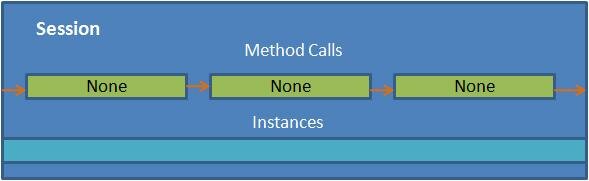
ReleaseInstanceMode.None

This property means that it will not affect the instance lifetime. By default ReleaseInstanceMode property is set to 'None'.

ReleaseInstanceMode.BeforeCall

This property means that it will create new instance before a call is made to the operation.
If the instance is already exist,WCF deactivates the instance and calls Dispose() before the call is done. This is designed to optimize a method such as Create()

ReleaseInstanceMode.AfterCall

This property means that it will deactivate the instance after call is made to the method.
This is designed to optimize a method such a Cleanup()

ReleaseInstanceMode.BeforeAndAfterCall

This is means that it will create new instance of object before a call and deactivates the instance after call. This has combined effect of using ReleaseInstanceMode.BeforeCall and ReleaseInstanceMode.AfterCall

Explicit Deactivate

You can also explicitly deactivate instance using InstanceContext object as shown below.
   [ServiceContract()]
    public interface IMyService
    {
        [OperationContract]
        void MyMethod();
    }

   
    [ServiceBehavior(InstanceContextMode=InstanceContextMode.Single)]
    public class MyService:IMyService
    {

        public void MyMethod()
        {
           //Do something
           OperationContext.Current.InstanceContext.ReleaseServiceInstance();
            
        }       
    }
 

Singleton Service

When WCF service is configured for Singleton instance mode, all clients are independently connected to the same single instance. This singleton instance will be created when service is hosted and, it is disposed when host shuts down.
Following diagram represent the process of handling the request from client using Singleton instance mode.
Let as understand the Singleton Instance mode using example.
Step 1: Create the service contract called IMyService and implement the interface. Add service behavior attribute to the service class and set the InstanceContextMode property to Single as show below.
    [ServiceContract()]
    public interface IMyService
    {
        [OperationContract]
        int MyMethod();
    }
Step 2: In this implementation of MyMethod operation, increment the static variable(m_Counter). Each time while making call to the service, m_Counter variable is incremented and return the value to the client
    [ServiceBehavior(InstanceContextMode=InstanceContextMode.Single)]
    public class MyService:IMyService
    {
        static int m_Counter = 0;

        public int MyMethod()
        {
            m_Counter++;
            return m_Counter;
        }       
    }
Step 3: Client side, create the two proxies for the service and made a multiple call to MyMethod.
static void Main(string[] args)
        {
Console.WriteLine("Service Instance mode: Singleton");
            Console.WriteLine("Client 1 making call to service...");
            //Creating the proxy on client side
            MyCalculatorServiceProxy.MyServiceProxy proxy = 
            new MyCalculatorServiceProxy.MyServiceProxy();
            Console.WriteLine("Counter: " + proxy.MyMethod());
            Console.WriteLine("Counter: " + proxy.MyMethod());
            Console.WriteLine("Counter: " + proxy.MyMethod());

            Console.WriteLine("Client 2 making call to service...");
            //Creating new proxy to act as new client
            MyCalculatorServiceProxy.MyServiceProxy proxy2 =
             new MyCalculatorServiceProxy.MyServiceProxy();
            Console.WriteLine("Counter: " + proxy2.MyMethod());
            Console.WriteLine("Counter: " + proxy2.MyMethod());
            Console.ReadLine();
  }
  
When two proxy class made a request to service, single instance at service will handle it and it return incremented value (1, 2, 3, 4), because instance mode is configured to 'Single'. Service instance is created when it is hosted. So this instance will remain till host is shutdown. Output is shown below.

Per-Session Service

When WCF service is configured for Per-Session instance mode, logical session between client and service will be maintained. When the client creates new proxy to particular service instance, a dedicated service instance will be provided to the client. It is independent of all other instance.
Following diagram represent the process of handling the request from client using Per-Session instance mode.
Let as understand the Per-Session instance mode using example.
Step 1: Create the service contract called IMyService and implement the interface. Add service behavior attribute to the service class and set the InstanceContextMode property to PerSession as show below.
    [ServiceContract()]
    public interface IMyService
    {
        [OperationContract]
        int MyMethod();
    }
Step 2: In this implementation of MyMethod operation, increment the static variable (m_Counter). Each time while making call to the service, m_Counter variable will be incremented and return the value to the client.
    [ServiceBehavior(InstanceContextMode=InstanceContextMode.PerSession)]
    public class MyService:IMyService
    {
        static int m_Counter = 0;

        public int MyMethod()
        {
            m_Counter++;
            return m_Counter;
        }       
    }
Step 3: Client side, create the proxy for the service and call "myMethod" operation multiple time.
        static void Main(string[] args)
        {
            Console.WriteLine("Service Instance mode: Per-Session");
            Console.WriteLine("Client  making call to service...");
            //Creating the proxy on client side
            MyCalculatorServiceProxy.MyServiceProxy proxy = 
            new MyCalculatorServiceProxy.MyServiceProxy();
            Console.WriteLine("Counter: " + proxy.MyMethod());
            Console.WriteLine("Counter: " + proxy.MyMethod());
            Console.WriteLine("Counter: " + proxy.MyMethod());
            Console.WriteLine("Counter: " + proxy.MyMethod());
            Console.ReadLine();
        }
All request to service return incremented value (1, 2, 3, 4), because we configured the instance mode to Per-Session. Service instance will be created once the proxy is created at client side. So each time request is made to the service, static variable is incremented. So each call to MyMethod return incremented value. Output is shown below.

Per-Call Service

When WCF service is configured for Per-Call instance mode, Service instance will be created for each client request. This Service instance will be disposed after response is sent back to client.
Following diagram represent the process of handling the request from client using Per-Call instance mode.
Let as understand the per-call instance mode using example.
Step 1: Create the service contract called IMyService and implement the interface. Add service behavior attribute to the service class and set the InstanceContextMode property to PerCall as show below.
[ServiceContract()]
    public interface IMyService
    {
        [OperationContract]
        int MyMethod();
    }
Step 2: In this implementation of MyMethod operation, increment the static variable(m_Counter). Each time while making call to the service, m_Counter variable is incremented and return the value to the client.
[ServiceBehavior(InstanceContextMode=InstanceContextMode.PerCall)]
    public class MyService:IMyService
    {
        static int m_Counter = 0;

        public int MyMethod()
        {
            m_Counter++;
            return m_Counter;
        }       
    }
 
Step 3: Client side, create the proxy for the service and call "myMethod" operation multiple time.
static void Main(string[] args)
        {
            Console.WriteLine("Service Instance mode: Per-Call");
            Console.WriteLine("Client  making call to service...");
            //Creating the proxy on client side
            MyCalculatorServiceProxy.MyServiceProxy proxy =
             new MyCalculatorServiceProxy.MyServiceProxy();
            Console.WriteLine("Counter: " + proxy.MyMethod());
            Console.WriteLine("Counter: " + proxy.MyMethod());
            Console.WriteLine("Counter: " + proxy.MyMethod());
            Console.WriteLine("Counter: " + proxy.MyMethod());
            Console.ReadLine();
}
Surprisingly, all requests to service return '1', because we configured the Instance mode to Per-Call. Service instance will created for each request and value of static variable will be set to one. While return back, service instance will be disposed. Output is shown below.
Fig: PercallOutput.